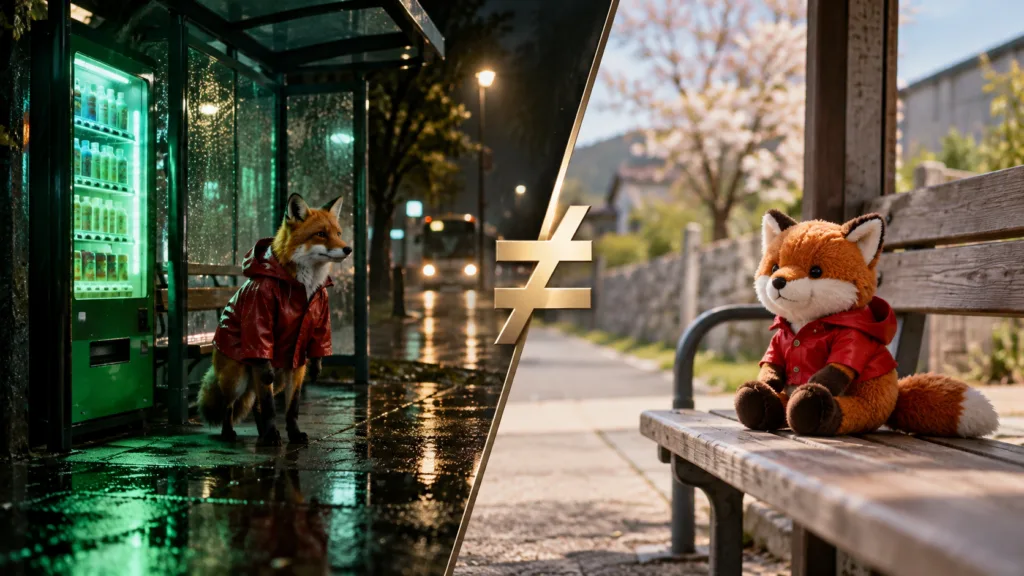
You find an image in the Prompt Library: a fox in a red raincoat at a bus stop, rain lit green by a vending machine. You press Copy prompt, paste it into your usual tool and press Generate. What comes back is a fox, in a raincoat, at a bus stop. It is also in daylight, it looks like a plush toy, and there is no vending machine.
Nothing is broken. You ran the same words through a different set of conditions, and the conditions matter as much as the words. This article explains what those conditions are and which ones to match first.
Four reasons the same words give different pictures
1. Every run starts from a new random draw
Image generators build randomness into each run, so two runs of one prompt explore two different starting points. In diffusion models the starting point is a field of noise set by a number called a seed. Change the seed and you get a new picture; that is a feature, since it lets you ask for several options at once.
Some tools let you fix the seed. Midjourney does, with the –seed parameter, but its own documentation on seeds is candid about the limits: seeds have the least influence on the final image, and the prompt, model version and small changes to settings can still produce unexpected results. AIContestList AI Studio does not offer a seed control. Each run is a fresh draw, which is why it can return up to four images per run for you to choose from.
2. A different model, or a different version of the same one
The same sentence means different things to different models. Each was trained differently and has its own defaults for light, color and composition, so a prompt written and tested on one model is partly tuned to that model.
Versions matter too. When Google released Nano Banana 2 in February 2026, it replaced the earlier default in Google’s apps. A prompt saved in 2025 now runs on a different model there. This is why every Prompt Library page lists the model and version only when they were recorded at the time the image was made. A guessed model would send you looking for a result that cannot be repeated.
3. Settings that never appear in the text
Aspect ratio changes the composition, not just the crop. Ask for a wide street scene in a 9:16 vertical frame and the model has to stack the scene or zoom in, so the result looks nothing like the 16:9 original. Size changes how much detail the model draws. A reference image, used in Image to Image mode, can outweigh the text entirely.
Style presets are another hidden input. In AI Studio, choosing a style preset adds a short block of style words to your prompt before it is sent; the General option adds nothing. If the original image used a preset and you don’t, you are running a different prompt.
4. Text the tool adds or rewrites
Some tools rewrite your prompt before the model sees it. OpenAI’s DALL·E 3 API, for example, returned a revised_prompt field showing the rewritten text it had actually used. In AI Studio nothing is rewritten unless you press Enhance, and the enhanced prompt is shown to you before you use it.
How to get closer to an image you saw
Work through these in order. Each step removes a bigger source of difference than the next.
- Match the model and version listed on the prompt page. If none is listed, assume an exact match is not possible and aim for the idea instead.
- Match the aspect ratio and size. These change composition and detail more than most single words do.
- Add the same reference image if one was used and you have the right to use it.
- Ask for several images per run and choose. Up to four is common, AI Studio included.
- Only then change the wording, one part at a time. How to Read an AI Image Prompt shows how to find which words control which part of the picture.
In the fox example, steps 1 and 2 would likely bring back the night scene. The vending machine needed one more change: the original prompt mentioned it once, at the end. Moving it into the first sentence (“a fox in a red raincoat waits beside a glowing vending machine”) made it part of the subject instead of a detail the model could drop.
Moving a prompt between models
Prompts written for Midjourney often carry habits that sentence-reading models such as Google’s Nano Banana family and OpenAI’s GPT Image models do not share.
| Prompt habit | In Midjourney | In Nano Banana or GPT Image |
|---|---|---|
| Parameters such as –ar 16:9 | Read as a setting | Read as plain text; set the ratio in the interface |
| Comma-separated tags | Common and workable | Workable, but full sentences are usually followed more closely |
| –no cars | Excludes cars | Describe the scene you want instead: “an empty street” |
| Style reference codes (–sref) | Copies a stored style | Use a reference image instead |
Google’s prompting guide for its Gemini image model makes the same point from the other side: describe the scene rather than list keywords. When you move a tag-style prompt to a sentence model, rewrite it as two or three sentences and move the parameters into the settings. Nano Banana or GPT Image? explains how the models in AI Studio differ.
When different is the point
Variation is useful. Four different takes on one prompt give you four compositions to choose from, and the one you did not expect is sometimes the best. What hurts is losing track of how you made the image you kept.
Keep your own record for every image you might use: the prompt, model, version, aspect ratio, size, any preset or reference image, and the date. AI Studio saves each result with its prompt in My Creations, but a separate note of what you changed between runs is worth the two minutes. Many competitions ask how an AI image was made, and some ask for the prompts. Read the Rules First covers what organizers tend to request.
The randomness has a legal side as well. In its January 2025 report on copyrightability, the U.S. Copyright Office pointed to the fact that identical prompts can produce different outputs as one reason prompts alone do not give a user enough control to be the author of the image. Can You Reuse Someone Else’s AI Prompt? looks at what that means for creators.
For how this fits into the rest of the site, see AIContestList, Explained.
Questions people ask
Why doesn’t my image match the Prompt Library example?
Usually because the model, version, aspect ratio or size differs, or because each run starts from a new random draw. Match the model and settings shown on the prompt page first, then generate several images and pick the closest.
Can I get exactly the same image twice?
Only on tools that let you fix a seed, with the same model version and settings, and even then not always. Midjourney’s documentation says seeds have the least influence on the final image. AI Studio has no seed control, so treat each run as a new draw.
Does a longer prompt make results more consistent?
It narrows the range. Each part you describe, such as the light or the camera position, is one less thing the model fills with its own default. Length alone does not help; specific words do.
Should I copy Midjourney parameters into other tools?
No. Sentence-reading models treat parameters such as –ar or –stylize as ordinary text. Set the aspect ratio and size in the tool’s own controls.
Sources
- Midjourney documentation, Seeds
- Ars Technica, Google releases Nano Banana 2 AI image generator, February 26, 2026
- Google for Developers, How to prompt Gemini 2.5 Flash Image Generation for the best results
- U.S. Copyright Office, Copyright and Artificial Intelligence, Part 2: Copyrightability, January 2025